
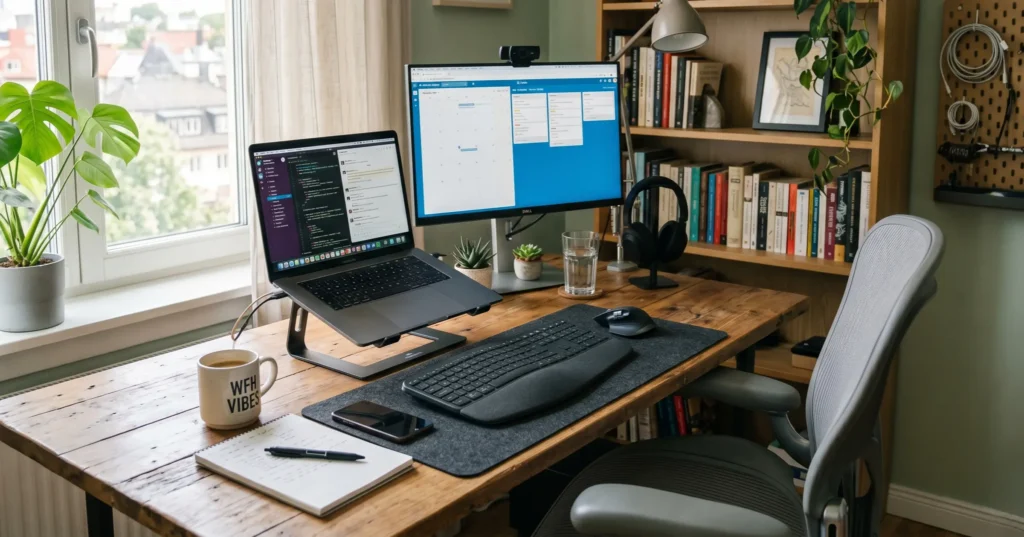
When I first started working from home, I made a big mistake — I thought I didn’t need a proper setup. I was working from my bed, sometimes from the dining table, and honestly, it felt okay for the first few days. But slowly, I started facing problems. My back hurt, my focus dropped, and my productivity was nowhere close to what it should be.
That’s when I realized something very important: your workspace directly affects your work quality.
The good news is — you don’t need to spend ₹1 lakh or build a fancy Instagram-style desk to work efficiently. I personally use a budget setup, and I’ve built it under ₹30,000 in India. In this article, I’ll share everything based on my real experience — what I use, what works, what doesn’t, and how you can build your own setup without wasting money.
Why a Proper Setup Matters
Let me be very honest — motivation comes and goes, but comfort and convenience stay.
When your chair hurts your back, when your laptop heats up, when your internet drops during meetings — you don’t feel like working. You get irritated. And slowly, your performance drops.
A good setup does three things:
- Keeps you comfortable for long hours
- Helps you stay focused
- Saves your time and energy
I learned this the hard way. But once I upgraded my setup step by step, I could literally feel the difference.
My Complete Setup Under ₹30,000
I didn’t buy everything at once. I slowly upgraded each item. Here’s the breakdown of what I currently use:
1. Laptop (Already Owned or Budget Option)
Most people already have a laptop, so I won’t include a new laptop in the ₹30,000 budget.
But if you are planning to buy one, even a basic laptop with:
- 8GB RAM
- SSD storage
- Decent processor (i3 / Ryzen 3 or above)
is enough for most remote jobs like:
- Content writing
- Coding (basic to intermediate)
- Video calls
- Freelancing
Personally, I use a mid-range laptop, and it works perfectly fine for my daily tasks.
2. External Keyboard (₹800 – ₹1,500)
This was one of the first upgrades I made — and honestly, it changed everything.
Typing on a laptop keyboard for long hours is uncomfortable. Your posture becomes weird, and your wrists start hurting.
After switching to an external keyboard:
- My typing speed improved
- My posture became better
- I could work longer without discomfort
You don’t need a fancy mechanical keyboard. A simple wired or wireless keyboard works perfectly.
3. Mouse (₹300 – ₹800)
I used to rely on the trackpad. Big mistake.
A mouse makes navigation much faster and easier, especially if you:
- Edit documents
- Work on spreadsheets
- Do design work
Even a basic mouse is enough. I personally use a simple wireless mouse, and it does the job well.
4. Laptop Stand (₹500 – ₹1,500)
This is one of the most underrated items.
Before using a laptop stand, I used to bend my neck constantly. That caused neck pain and headaches.
After using a stand:
- My screen is at eye level
- My posture improved instantly
- My back pain reduced a lot
I strongly recommend this. It’s a small investment but gives a huge benefit.
5. Chair (₹5,000 – ₹8,000)
If there’s one thing you should NOT compromise on, it’s your chair.
I started with a normal plastic chair — and within weeks, my back started hurting badly.
Then I switched to a budget ergonomic chair. Not very expensive, but:
- It supports my back
- I can sit for long hours
- It feels comfortable
You don’t need a ₹20,000 chair. Even a good ₹6,000–₹7,000 chair is enough if you choose wisely.
6. Table / Desk (₹3,000 – ₹6,000)
I didn’t buy a fancy desk. I just got a simple study table.
What matters:
- Enough space for laptop + keyboard + mouse
- Stable surface
- Comfortable height
You can even reuse an existing table if it’s good enough.
7. Good Internet Connection (₹500 – ₹1,000/month)
This is non-negotiable.
Slow internet = frustration.
I upgraded to a reliable broadband connection, and it made a huge difference:
- No call drops
- Smooth video meetings
- Faster downloads
Trust me, don’t try to save money here.
8. Headphones / Earphones (₹800 – ₹2,000)
For meetings, calls, and focus — headphones are very useful.
I personally use budget earphones with a mic, and they work fine.
Benefits:
- Clear communication
- Less background noise
- Better concentration
9. Power Backup (Optional but Useful) (₹2,000 – ₹5,000)
If you live in an area with frequent power cuts, this is important.
I use a basic UPS for my WiFi router, so even if power goes off:
- My internet keeps working
- Meetings don’t get interrupted
Total Cost Breakdown
Here’s a rough estimate:
- Keyboard: ₹1,000
- Mouse: ₹500
- Laptop Stand: ₹1,000
- Chair: ₹6,000
- Table: ₹4,000
- Headphones: ₹1,500
- UPS: ₹3,000
Total: Around ₹17,000 – ₹20,000
Even after adding some extras, you can easily stay under ₹30,000.
Things I Avoided in the setup
Let me save you some money.
I did NOT buy:
- RGB lights (look cool, not useful)
- Expensive monitor (not needed initially)
- Fancy desk accessories
- Overpriced branded items
Focus on function, not looks.
My Daily Routine with This Setup
With this setup, my workflow looks like this:
- I sit comfortably without back pain
- My screen is at eye level
- I type faster and work efficiently
- Calls are clear and smooth
Because everything is set properly, I don’t waste time adjusting things again and again.
And honestly, that’s what matters.
Final Thoughts
You don’t need a perfect setup. You need a practical setup.
Start small. Upgrade slowly.
I personally use this kind of setup, and it works really well for me. It’s comfortable, affordable, and efficient.
If you’re just starting remote work, don’t overthink it. Just build a simple, functional workspace — and you’ll see the difference yourself.

I am Pranjal, a Digital Marketing Professional based in Bangalore. I have over 7 years of experience as a Remote Digital Marketing Professional.
Through RemoteCareer.in, I provide actionable roadmaps, resume strategies, and career guidance to help you land high-paying remote roles.